How to Block Gambling Sites on iPhone (2026 Guide)
To block gambling sites on iPhone, use Apple's Screen Time: turn on Content & Privacy Restrictions, limit adult websites, and add each gambling site to the Never Allow list. Restrict the betting apps separately. Or let an app like Recovo set up Screen Time for you and add an always-on Safari blocklist of known gambling sites.
The fastest way to block gambling sites on iPhone is Apple's built-in Screen Time system — either set up manually yourself through Settings, or with an app like Recovo, which walks you through the same setup in about a minute and adds an always-on Safari extension covering 430+ gambling sites on top of it. Screen Time works at the operating-system level, so a site you add is blocked in Safari, Chrome, and any other browser you install.
This guide walks through both: the manual setup, so you understand exactly what's happening under the hood, and the automatic option, for when you'd rather not build and maintain the list yourself.
Why blocking works better than willpower alone
Gambling apps and sportsbooks are built to be one tap away, always. In the moment an urge hits, the decision to open the app happens faster than the decision to stop yourself. Blocking removes the option before the urge has a chance to win. It puts friction between you and the bet, at the system level, so staying clean doesn't depend on how strong you feel at 2AM. For the fuller argument and the other pieces that go around a block, start with how to stop gambling when willpower isn't working. What comes before a relapse is worth reading next, because it shows when a block has to be in place.
Method 1: Block gambling sites manually with Screen Time
Apple's Screen Time has everything you need to block gambling websites yourself, at no cost. It takes about ten minutes to set up properly. The steps below follow Apple's own instructions for blocking websites on iOS 26.
On iOS 27, the menus moved. Apple reorganized Screen Time, and its own instructions now put App Store controls under Screen Time → Apps & Websites → App Store, with settings switched to "Blocked" rather than "Don't Allow". If a step below doesn't match your phone, look under Apps & Websites.
- Open Settings → Screen Time and turn it on if you haven't already.
- Tap Content & Privacy Restrictions and turn it on. Set a Screen Time passcode. Use one that's different from your device passcode, and ideally one you don't hold yourself (more on that below).
- Tap App Store, Media, Web, & Games → Web Content.
- Choose "Limit Adult Websites." This turns on Apple's built-in filtering and unlocks a custom list.
- Under "Never Allow," add every gambling and sportsbook domain you want blocked: DraftKings.com, FanDuel.com, BetMGM.com, Caesars.com, and any others you use. Safari will refuse to load anything on this list.
The catch: this only blocks web addresses in Safari. Gambling apps need their own step, covered next. You're also responsible for keeping the domain list current yourself, and typing each one in by hand makes it easy to miss one.
How to block gambling apps on iPhone
The Never Allow list only takes web addresses, so the DraftKings or FanDuel app carries on working until you deal with it separately. Settings has no switch for one specific app: Allowed Apps & Features only covers Apple's built-in apps. That leaves two routes.
Using Settings alone: delete the betting apps, then go to Screen Time → Content & Privacy Restrictions → iTunes & App Store Purchases and set Installing Apps to Don't Allow. Putting one back now takes the Screen Time passcode. The cost is that this stops every new app, not just gambling ones, until the passcode holder lets it through.
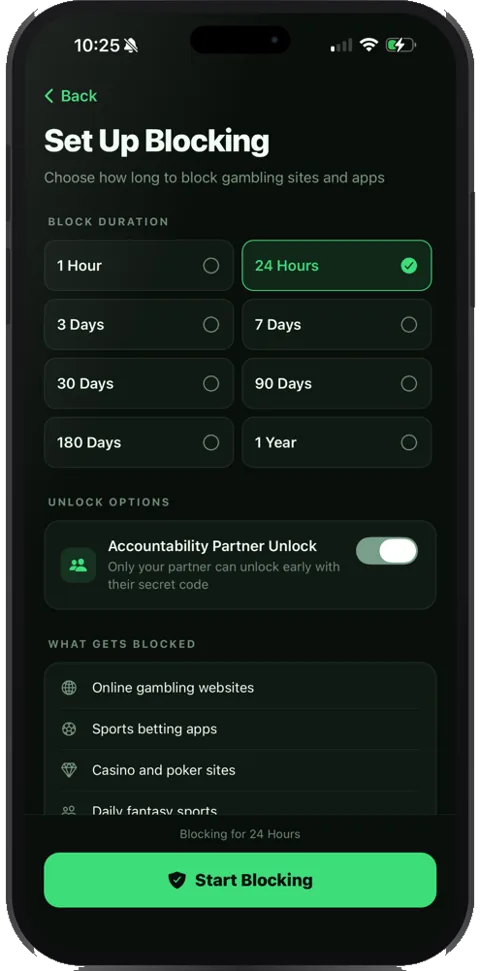
Using Recovo: you choose the betting apps in Apple's own app picker, with Recovo telling you what to look for, and they stay blocked alongside their websites for as long as the block runs. Everything else on your phone keeps working, and new apps still install.
Method 2: Automatic blocking with Recovo
Recovo works in two layers. The first is a built-in Safari extension that comes pre-loaded with a maintained list of 430+ gambling sites — plus every .casino, .bet, .poker, .bingo, .slots and .lotto address, which is what catches the throwaway domains that rotate faster than any list can track. Switch it on and it's always on, with no list to build and no timer.
The second layer is the same Apple Screen Time (Family Controls) technology as the manual method above, which is what covers other browsers and the gambling apps themselves. Apple only lets you choose apps and sites through its own picker, and no app can pre-fill it for you, so Recovo walks you through that step, telling you exactly what to look for. Once it's done, what you picked is blocked in every browser, and Apple caps that at about 50 websites.
What comes with it beyond the block itself:
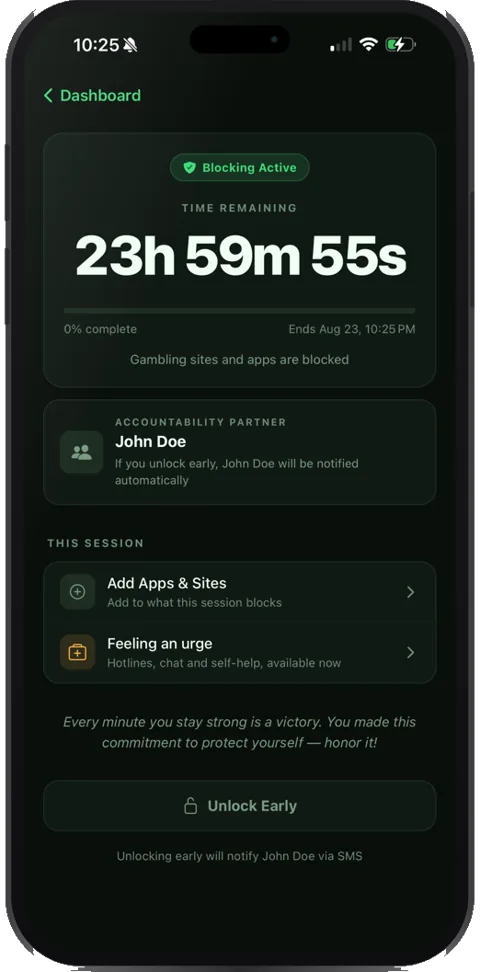
- A streak counter that tracks every day you stay bet-free, so there's something concrete to protect.
- An accountability partner unlock code. Turning the block off requires a code sent by SMS to someone you trust, so you can't quietly end a timed block yourself in the middle of an urge, which is exactly the moment a self-held Screen Time passcode gets switched off.
- A private journal for working through triggers, backed up to your account and never sold or shared.
Which method should you use?
If you want full manual control over exactly what's blocked, don't mind maintaining the list yourself, and trust yourself to hold the Screen Time passcode, plain Screen Time works fine on its own.
If you'd rather it be handled automatically, want ending a block early to take someone else's code, and want your streak tracked in one place, Recovo does the same underlying job with a person built into the loop.
Common questions
Can you get around a Screen Time block?
If you hold your own Screen Time passcode, yes: you can always turn restrictions off. That's why the passcode (or unlock code, in Recovo's case) matters more than the block itself. Have a partner, family member, or friend hold it instead of you.
Does this cover apps like DraftKings, FanDuel, and BetMGM, or just websites?
Partly, with the manual method: Settings can't switch off one specific app, so you delete the betting apps and stop new installs, which keeps them off but also blocks every other new app until the passcode holder allows it. Recovo restricts the betting apps themselves: you pick them in Apple's own app picker, with Recovo telling you what to look for, and they stay blocked alongside their websites.
What if a gambling site still loads?
In Safari, check that Recovo's Safari extension is switched on, since iOS ships it switched off. In Chrome or another browser, you need a timed Screen Time block, because the Safari extension only covers Safari. If neither fixes it, the site isn't on the list yet and you can send it in from the app. The full checklist is in a gambling site still loads.
Is the block permanent?
No. You can reverse it with the passcode or unlock code, by design. A block won't make gambling technically impossible forever. It makes it slow enough, and visible enough to someone else, that the urge passes before you act on it.